General Page
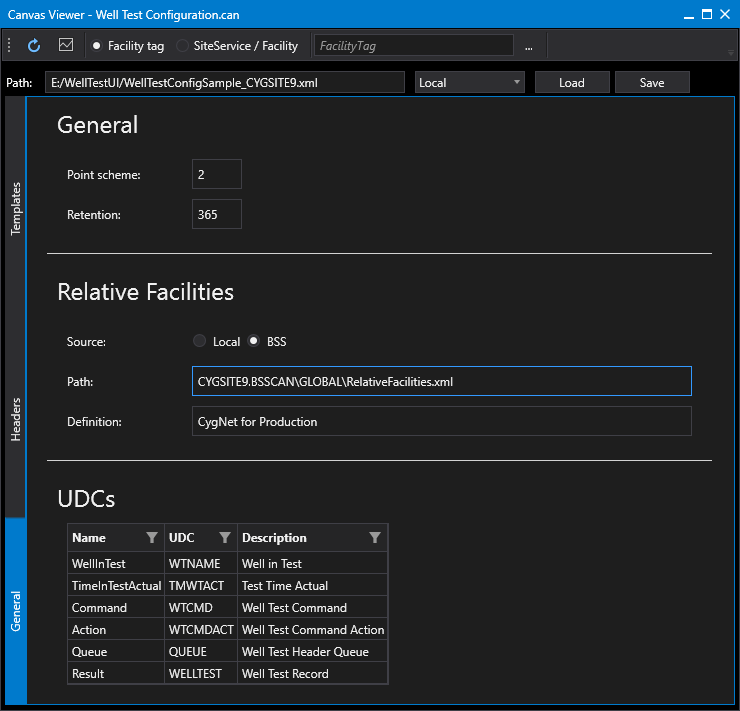
The General page of the well test configuration control defines general properties required by the CygNet Well Test module, and consists of the following sections:
- General
- Relative Facilities
- UDCs
Screen designer tip:
You can hide this page by disabling the Show general property in the Canvas Design view.
|
Click the thumbnail to see the |
To configure General Well Test properties
Perform the following steps to configure the general well test properties, referring to the property definitions below:
- Click the General tab on the left side of the screen.
- Configure the Point scheme and Retention values.
- Configure the Relative Facilities properties: Source of the file, Path to the file, and name of the Relative Facility Definition. See Creating the Relative Facilities File for more information.
- Configure any new UDCs as necessary.
- Save any changes.
- Click the Headers tab on the left side of the screen to continue well test configuration.
General
The General configuration section of the General page defines the Point Scheme used by the CygNet Well Test module and the length of time to retain well test records.
| Property | Description | XML |
|---|---|---|
|
Point scheme |
Specifies the Point Scheme used by the CygNet Well Test Module. |
|
|
Retention |
Specifies the number of days to retain the well test records. |
Relative Facilities
The Relative facility configuration section of the General page defines the location of the relative facilities file and name of the definition set.
Note: See Creating the Relative Facilities File for instructions on how to get relative facility settings from a Canvas installation.
| Property | Description | XML |
|---|---|---|
|
Source |
Specifies the path type for the relative facility file. Supported options include Local or BSS. |
|
|
Path |
Specifies the path to and filename of the relative facility file. |
|
|
Definition |
Specifies the relative facility definition set to use for the configuration. This is only needed if there are multiple definition sets in the relative facility file. |
UDCs
The UDC configuration section of the General page defines the UDCs where the CygNet Well Test module will post well test values to well-known points.
| Property | Description | XML | |
|---|---|---|---|
|
Name |
Specifies the nice name for the UDC. Possible UDC name types include:
|
||
|
UDC |
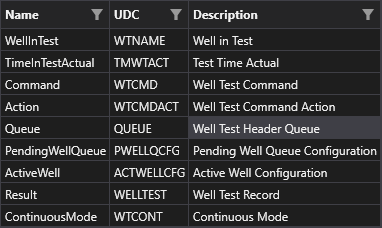
Specifies the UDC of each UDC type. When you create a new configuration in the Canvas Well Test Configuration control several default UDCs will be provided. These default UDCs correspond to the UDCs used in the sample Canvas screens. You can choose to keep the same UDCs or specify others as necessary. The default UDCS are as follows:
|
||
|
Description |
Specifies the description of each UDC type. |